
To add a cannabis license that you have applied for, but not yet been awarded, follow the steps below:
1. From the Cannabis Licenses page, select Add License
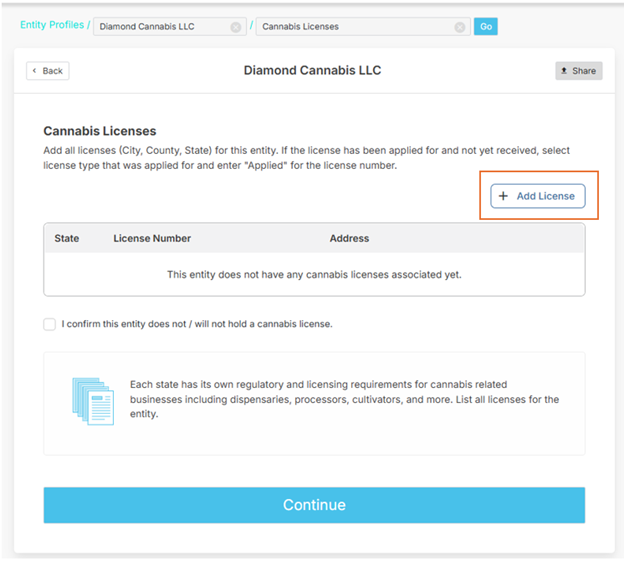
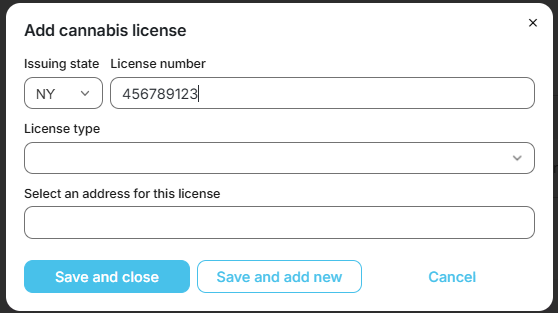
2. Choose the licensed state from the drop down and enter the license number, if known. If the license number is not yet known, enter "Applied"
3. Choose the Applied license type from the drop down or the license type in which you have applied
4. Select the address that will be associated with the license.
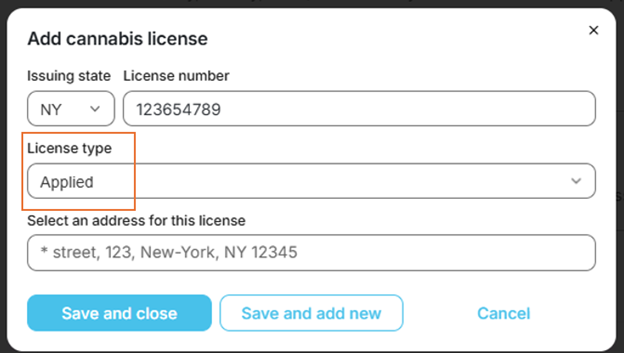
Note: if applicable address is not on list, click Cancel, then hit the back button to return to the location screen to add the address associated with the license.
5. Click Save and close or Save and add new if you have other licenses to add.
Was this article helpful?
That’s Great!
Thank you for your feedback
Sorry! We couldn't be helpful
Thank you for your feedback
Feedback sent
We appreciate your effort and will try to fix the article